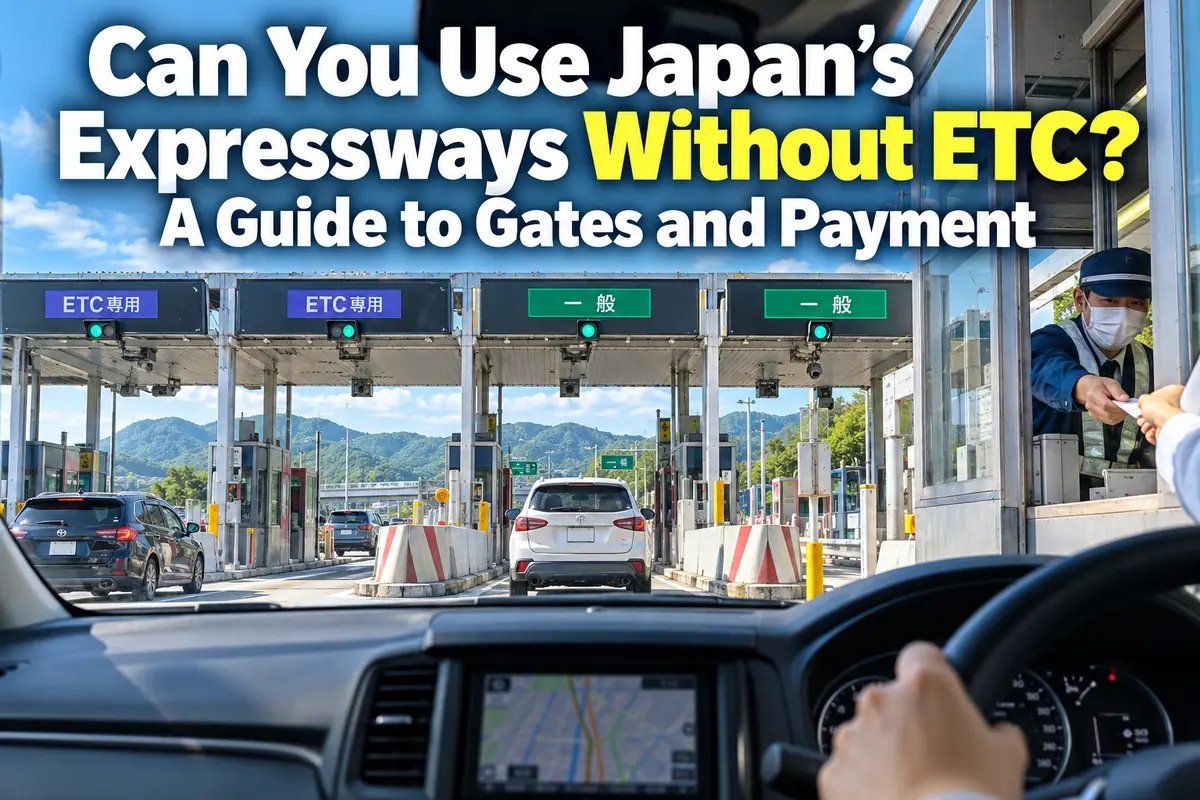
Can You Use Japan’s Expressways Without ETC? A Guide to Gates and Payment
Yes—where the entrance and exit accept non-ETC traffic. Use a lane marked 一般 (general), collect a ticket if one is issued, and pay at the designated tollgate in Japanese yen or with an accepted credit card. However, an ETC-only entrance cannot be used simply because you have cash or a bank card. NEXCO East’s payment guide explains the standard ticket-and-payment procedure.
The important check happens before you drive: can you use your planned entrance and exit without ETC? This guide is for foreign residents, families, and rental-car drivers who need to plan an expressway journey without an active ETC setup.
- Choose general or mixed ETC/general lanes where available.
- Avoid ETC-only entrances and Smart ICs.
- Keep any entrance ticket until payment is complete.
- If you enter the wrong lane, stop and ask staff for help; never reverse.
Official information checked on October 8, 2026. Gate availability and payment arrangements depend on the road operator and individual interchange.
Before leaving: check the gates, not just the road
A route is usable without ETC only if its access points support your payment method.
ETC stands for Electronic Toll Collection. It uses communication between equipment in the vehicle and equipment at the tollgate. An onboard reader alone is not enough: a valid ETC card must be inserted. For a rental car, ask separately whether the vehicle has the reader and whether an ETC card is included or available. NEXCO East explains these requirements.
If you will drive without ETC, prepare:
- Your entrance and exit names, including the direction of travel.
- Confirmation from the operator that those gates accept non-ETC traffic.
- Japanese yen and an accepted physical credit card as an alternative.
- A place within reach to keep the entrance ticket.
- An alternative route using compatible interchanges or ordinary roads.
Do not assume that a navigation app’s suggested route is suitable for cash payment. Treat the operator’s gate information as a separate planning check.
Smart ICs are a different kind of access point
A Smart IC, shown as スマートIC, is an ETC-only interchange. “IC” means interchange—the connection between the expressway and other roads.
NEXCO Central states that Smart ICs require valid ETC equipment and a valid ETC card. Cash and ordinary credit-card payment are unavailable. Some also restrict vehicle categories, operating hours, or directions of entry and exit. Check the official Smart IC guidance.
A conventional interchange can also become ETC-only. Avoiding names containing “Smart IC” therefore does not complete the check.
At the toll plaza: read the current lane sign
Choose a lane by its displayed label, rather than following the vehicle ahead.
These are the main signs to recognize:
- 一般 — ippan, general: the lane for non-ETC payment.
- ETC/一般 — ETC/general: a mixed lane that also accepts vehicles without ETC.
- ETC専用 — ETC sen’yō, ETC only: requires a working ETC setup.
- サポート — sapōto, support: assistance for problems at an ETC-only gate; not a normal cash-payment lane.
NEXCO Central confirms that vehicles without ETC may use mixed ETC/general lanes. It also warns that lane designations can change with the time of day. A red signal means the lane is closed. Its gate-sign guide shows the distinctions.
Read the overhead signs early, slow down, and move into the appropriate open lane while it is safe to do so. At a general lane, prepare to stop for the ticket machine, payment machine, or attendant.
How a normal non-ETC journey works
The common procedure is to take a ticket at entry and pay at exit, but some roads collect payment earlier.
1. Take the entrance ticket
At a compatible entrance, use the general lane and stop at the ticket machine. Collect the ticket before proceeding.
The ticket records information such as the entrance interchange and vehicle category. It lets the exit tollgate identify where your journey began. Put it somewhere accessible; do not leave it loose among shopping receipts.
2. Keep it through the journey
An entrance ticket is needed for payment at the exit. NEXCO Central specifically tells drivers to retain it. Its toll-collection guide also notes that some tolls are collected at entrance booths.
If you paid at entry, keep the receipt or other document issued. Follow the procedure for that road rather than expecting every toll plaza to use the same sequence.
3. Pay in a suitable exit lane
Where payment is collected at exit, choose a general or mixed lane and stop. Give the ticket to the attendant or insert it into the designated machine slot, then follow the payment instructions.
NEXCO Central provides both staffed general lanes and general lanes with toll-collection machines. Its illustrated payment-machine leaflet identifies ticket, cash, card, receipt, change, and assistance controls.
Collect any change and receipt, and proceed only when the gate permits it. If a machine rejects your payment or you cannot identify the correct slot, use the intercom instead of getting out to investigate.
Payment and costs: use the non-ETC quote
Budget for the route and payment method you will actually use.
NEXCO East and NEXCO Central accept Japanese-yen cash and supported credit cards at their applicable general toll lanes. This does not establish acceptance on every separately operated toll road. Check the operator’s payment information, especially when relying on a foreign-issued card.
Do not treat a phone wallet, transport IC card, or ordinary bank card as a substitute for an ETC card in an ETC-only lane. The lane requires the ETC system, not merely a cashless way to pay.
Why there is no single expressway price
Before comparing costs, identify:
- The vehicle category used by the operator.
- The exact entrance and exit.
- Whether the quote is for ETC or non-ETC travel.
- Any additional toll-road sections in the journey.
For Tokyo-area journeys, Shutoko’s English toll and route search includes a cash option. Use that setting when planning a non-ETC trip rather than budgeting from an ETC result.
If you are considering renting an ETC card, compare the rental company’s card fee and billing terms with the operator’s toll quote. A reader already installed in the car does not tell you whether card rental is included.
ETC-only conversions: an old route may no longer work
Recheck an entrance even if you successfully paid cash there on an earlier trip.
Shutoko, the Metropolitan Expressway network serving the Tokyo and Yokohama area, is converting entrances to ETC-only operation. Its current English list includes further conversions during 2026. For example, it lists Hirai-ohashi on the inner Central Circular Route as becoming ETC-only on October 1, 2026. That matters to a driver returning to a familiar entrance: previous cash access is no guarantee of current access. Check Shutoko’s live conversion list.
At Shutoko’s ETC-only entrances, cash and credit-card payment are unavailable, and handing over an ETC card is not an alternative to wireless ETC operation.
The practical response is to choose another compatible entrance before starting. A support lane is for resolving trouble, not a planned workaround for missing ETC.
If something goes wrong: stop and contact staff
A wrong lane or closed barrier is a reason to ask for assistance, never to reverse or make a U-turn.
You accidentally enter an ETC-only entrance
At a Shutoko ETC-only entrance, the operator instructs drivers to proceed to the support lane, stop beside the intercom, press the call button, and follow staff instructions. Staff may request a driving licence. Stay in the vehicle near the toll booth.
At another operator’s gate, follow its displayed instructions and use the assistance button or intercom. Do not assume that the same payment or recovery procedure applies everywhere.
The barrier stays closed
Stop before the barrier. Do not try to drive around it or push through.
NEXCO East’s ETC guidance explicitly warns drivers never to move backwards when the barrier fails to open. Staff can speak through the intercom and direct the next action.
Useful phrases include:
- ETCカードがありません。 ETC kādo ga arimasen. — I do not have an ETC card.
- 通行券をなくしました。 Tsūkōken o nakushimashita. — I lost my toll ticket.
- 英語でお願いします。 Eigo de onegai shimasu. — English, please.
The last phrase is a request; English assistance is not guaranteed at every gate.
You lose the ticket or cannot pay
Use the intercom or tell the attendant immediately. Have your entrance name and approximate entry time ready to explain the journey. Let staff determine the correct charge and payment procedure.
If you receive follow-up payment instructions, retain them and check the stated deadline. Do not assume that passing the barrier means the toll has been settled.
Common mistakes to avoid on the next trip
Most avoidable problems start with an assumption about access, equipment, or payment.
- “The car has an ETC reader, so I can use ETC.” Confirm the card is also present and usable.
- “A normal interchange must have a cash lane.” Check whether it has converted to ETC-only operation.
- “I can hand over my credit card in an ETC lane.” Choose a compatible general or mixed lane instead.
- “The support lane is the cash lane.” Plan a route that accepts non-ETC traffic.
- “I should back up if I chose incorrectly.” Stop and contact staff.
- “Last year’s route is still suitable.” Recheck both access points before departure.
For an occasional journey, non-ETC driving remains practical where compatible gates are available. For repeated trips, ask whether obtaining or renting an ETC card would make your usual routes easier to use.
Before leaving, make one final check: does the specific entrance, in your direction of travel, still accept non-ETC vehicles—and does your planned exit support the journey?
参照リンク
- NEXCO East: How to Pay the Expressway Toll
- NEXCO East: How to Use ETC
- NEXCO Central: Introduction to Smart IC
- NEXCO Central: Gate Display Examples and Usage
- NEXCO Central: Toll Collection Methods
- NEXCO Central: Tollgate and Payment-Machine Leaflet
- Shutoko: English Toll and Route Search
- Shutoko: ETC-Only Entrances and Assistance Instructions